Introduction to React
Web Development 2 WEBD-2008
Red River College
Introduction
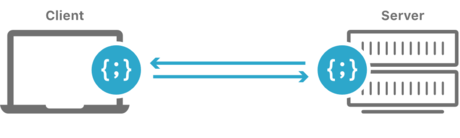
In the early days of the web all HTML was stored or generated on the server. As websites grew in complexity, developers began to use Javascript to dynamically change a page’s markup.
In recent years a number of Javascript libraries have been developed to make browser-generated markup easier to manage.
In this module we will explore this style of “client-side” web app development using React, an open-source UI library sponsored by Facebook.
Objective
Upon completion of this module, you should be able to:
- Explain the purpose of a JS component library.
- Describe what a component is within the context of React.
- Write and render valid JSX markup.
- Build simple React components with configuration properties.
- Make use of loops and conditional within your components.
Module Plan
- What are Components?
- Overview of Component Libraries
- Introduction to React
- JSX - XML in Javascript
- Components as Functions
- Props Stand for Properties
- Loops and Conditional
Existing Component Libraries
You may have heard of front-end tools like Ember, Angular, React, Vue, or Svelte.
Despite what you may have read online about some of these frameworks being hot and others being not, they all have thriving communities.
Some have been around for a while (Ember) while others are relatively new (Svelte). They all have fans and detractors. They all have pros and cons.
For this course we’ve opted to teach React, but the ideas you learn in this module can be translated to the others.
Today’s hotness is tomorrow’s old news. And so it goes.
Resources
Single Page Applications

Up to this point in the course we’ve been building sites with server-generated markup where every user interaction causes the browser to load a new server-rendered page.
React allows us to develop what are called Single Page Applications or SPAs for short.
Once a browser loads an SPA:
- All user interactions are handled by Javascript.
- Link clicks and form submissions no longer trigger page reloads.
- Javascript is used to fetch and submit JSON data while dynamically rewriting the page markup.
A Word About Web Components

There is a W3C specification called “Web Components”.
Web Components allow you to create new custom, reusable HTML tags to use in web pages, but are different from React components.
We won’t be covering Web Components in this course, but you might want to look into this complimentary technology.
Introducing React

React (also known as React.js) is a component library maintained by Facebook, along with a community of open-source developers.
It was first used internally at Facebook and Instagram in 2011/2012 and was released as an open-source library in 2013.
React is built on the following concepts:
- Declarative Components
- Embedded XML Syntax
- Immutable State
We’ll review each of these in the coming sections.
What are Components?
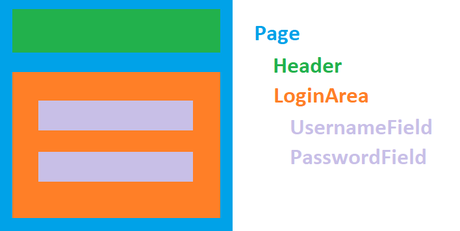
When we talk about components in this module we mean a named collection of HTML elements that accepts data and configuration properties.
You can think of components as customizable HTML templates for reusable pieces of a web application.
Instead of messing with document.createElement() and friends to create our components, React allows us to declare what we want built and the library deals with the DOM for us.
An Example Page Component
The image above shows a possible component breakdown for a page within an application that includes a login area.
The Page component contains two “child” components, Header and LoginArea.
LoginArea is itself a “parent” of two “child” components, UsernameField and PasswordField.
Resources
Local vs Cloud Development

Developing React applications locally on your laptop means installing and configuring the Node.js package manager npm.
We’re going to skip local development, for now, in favour of building cloud-based React apps with CodePen.io.
“CodePen is a social development environment for front-end designers and developers. Build and deploy a website, show off your work, build test cases to learn and debug, and find inspiration.”
📢 Note: Sign-up for a CodePen account so that you can save your work.
CodePen - Live Code Examples
Some of code examples in these notes are embedded CodePens.
By the end of these notes you’ll be able to build components like the Country component shown here:
See the Pen
Simple React Component with Props by Kyle Geske (@stungeye)
on CodePen.
📢 Note: Click “edit on codepen” (top right corner) to mess around with the code. Try styling the component in the CSS tab.
JSX

Consider the following Javascript:
const header = <h1>Hello JSX!</h1>;
Wait! Is that HTML mixed in with Javascript?
Almost…
It’s JSX, a syntax extension to Javascript that allows us to declare markup within our code.
JSX is XML in Javascript.
But watch out, JSX isn’t built into Javascript. We need Babel to transpile our JSX into regular Javascript.
Babel Compiles JSX into Pure Javascript
Go back to the last CodePen and click the “View Compiled” button to see the Javascript version of the JSX. Babel transpilation is built in to our React CodePen Template settings.
Resources
JSX Validity
Browsers are very forgiving when parsing markup. The following is valid HTML5:
<p>We are not closing our paragraphs.
<p><img src="image.png">
<p>And the img tag does not self close.
In order to be valid JSX we’d have to include the paragraph close tags and self-close the image tag with a trailing / like this:
<img src="image.png" />
The rules of JSX:
- Tags with content must have close tags.
- Tags without content must “self-close” with a forward slash.
Embedding Expressions in JSX

Use curly “moustache” braces to echo variables in JSX:
const name    = 'Moustache Face';
const element = <h1>Hello, {name}!</h1>;

// <h1>Hello, Moustache Face!</h1>
Any valid Javascript expression works:
const math = <p>2 plus 2 = {2 + 2}</p>;
const text = 'Wally Glutton is a Ghost.';
const h2   = <h2>{text.replace('Wally', 'Daisy')}</h2>;

// <p>2 plus 2 = 4</p>
// <h2>Daisy Glutton is a Ghost.</h2>
Use curly braces to set element attributes:
const filename = 'image.png';
const image    = <img src={filename} />;

// <img src="image.png" />
⚠️ Warning: When setting attributes don’t wrap curly braces in quotes.
If you have: const inputText = "Wooky!";
✔️ Do: <input value={inputText} />
❌ Don’t: <input value="{inputText}" />
❌ Don’t: <input value="inputText" />
Rendering JSX
We can display JSX within a webpage using ReactDOM.render():
See the Pen
Our First JSX Element by Kyle Geske (@stungeye)
on CodePen.
jsxElement - The first argument of ReactDOM.render() is the JSX to render.
rootElement - The second arg is the render location in the HTML (DOM reference).
📢 Note: Click the HTML tab to see the div#root referenced by rootElement.
CodePen Auto-Imports Dependencies
These CodePens were configured to auto-include the React dependencies, so missing from the code are the imports:
import React from "react";
import ReactDOM from "react-dom";
My First React Component
Let’s render a simple React component:
See the Pen
Hello React Component by Kyle Geske (@stungeye)
on CodePen.
Things to know about React components:
- React components are functions name in CamelCase.
- Functional component return JSX.
- Components are declared as JSX elements of the same name:
<Hello />
Props is Short for Properties
React components can be made configurable by accepting a single props parameter.
Let’s update the Hello component to accept and use a name property:
function Hello(props) {
  return <p>Hello {props.name}</p>;
}
A component’s attributes become properties of the props object:
<Hello name="Wally" />
<Hello name="Daisy" />
👆 In this example the values of the name attributes are assigned to props.name within the declared Hello components.
Components within Component
To demo props let’s nest two Hello components in a new App component:
See the Pen
React Components within Components by Kyle Geske (@stungeye)
on CodePen.
👆 Rendering the App component into the rootElement on the last line of code.
Multiple Props
Components can accept any number of props. Let’s add a greeting prop:
See the Pen
Multiple Props React by Kyle Geske (@stungeye)
on CodePen.
📢 Note: The order of the attributes on a JSX element does not matter.
Destructuring Props
Use a destructuring function parameter to unpack the prop object properties:
See the Pen
Destructuring Props React by Kyle Geske (@stungeye)
on CodePen.
👆 Instead of props.greeting and props.name we now use greeting and name within the component.
Destructuring Function Parameters
Destructuring can be used for any function parameter in Javascript. For example:
function logLove({ count, animals }) {
  console.log(`I love you as much as ${count} ${animals}.`);
}

const data = { count: 42, animals: 'Elephants' };
logLove(data);
Resources
Default Props Values
Destructuring the function parameter allows for prop defaults:
See the Pen
Default Props Values React by Kyle Geske (@stungeye)
on CodePen.
👆 The Hello component can now be declared with zero, one, or two attributes.
Loop Da Loop With Map
Use map to create components from collections of data:
See the Pen
Looping with Map React by Kyle Geske (@stungeye)
on CodePen.
📢 Note: Components created with map must be assigned a unique key attribute.
It’s best to use database IDs for keys, but if IDs aren’t available use the map index as above.
Country Explorer App

A “World Countries” React app using:
- Array of country data from the restcountries.eu API.
Country component that accepts props for a name, population, area, and flag image url.App component that uses map to declare one Country component for each element in our country array.
📢 Note: Let’s agree not to worry about how the data loading works for now.
We’ll learn a more integrated approach to loading data in React in a later module.
React Countries App
Our shiny new Country App:
See the Pen
React Countries Basic by Kyle Geske (@stungeye)
on CodePen.
📢 Note:
- Component styles are provided by MVP.css, which is a dependency of our codepen. There’s a small amount of additional CSS in the CSS tab.
- The
Country component leverages HTML details/summary elements for expandable content.
- JSX elements can be declared across multiple lines as seen within
App where a Country element spans three lines.
Conditional JSX - &&
We can optionally include JSX using a Boolean &&.
Let’s add an optional sup element for densely populated countries:
See the Pen
React Countries Conditional JSX by Kyle Geske (@stungeye)
on CodePen.
👆 Our first component with code above the return statement.
📢 Note: This technique works because true && expression always evaluates to expression, and false && expression always evaluates to false.
Resources
Conditional JSX - Ternary
Use a ternary to conditionally render different text or different components:
See the Pen
React Countries Ternary Conditional JSX by Kyle Geske (@stungeye)
on CodePen.
👆 The Region component will display “None” if region prop is an empty string.
Scroll to “Bouvet Island” to see this in action.
Build A Thing Now Will Yeah?
It’s your turn.
Use one of these CodePen templates to build a React component.
Each template is pre-wired to an API data source.
JSX Quirks
As you work with JSX you’ll notice that it differs from HTML in a few ways:
Assigning a Class an Element
✔️ Do: Use className attribute instead of a class attribute.
Event Handler Attributes
✔️ Do: Use CamelCase for all event attributes. Example: onClick instead of onclick.
✔️ Do: Use htmlFor attribute instead of a for attribute.
A few JSX form inputs also differ from HTML:
Textarea Element Values
✔️ Do use a value attribute: <textarea value="☕" />
❌ Don’t use content: <textarea>☕</textarea>
Specifying Selected Options
✔️ Do specific selected option using a value attribute on the select:
<select value="⚡">
  <option value="⚡">
  <option value="🎈">
</select>
❌ Don’t use the selected attribute to select an option:
<select>
  <option selected value="⚡">
  <option value="🎈">
</select>
What's Next?
You’ve now reviewed the basics of React.
In the next module you’ll learn more advanced React topics like:
- Handling User Events
- Maintaining Component State
- Fetching JSON Data
- Handling Form Input
- Styling Components with CSS