Nobody Knows Shoes
WinnipegRb Meetup
Kyle Geske
About Me
Kyle Geske
- Hardware/Firmware Engineer Turned Web Developer
- Instructor at Red River College
(Ruby/Rails, PHP, HTML/CSS, Philosophy of Time Travel)
- Artist - Shared studio space with my dad @ Artspace
V-World Avatars
- Twitter, Flickr, Pinboard, Github, Gmail, Etc:
stungeye
- Web: stungeye.com
- AKA: Walter S. Glutton
Shoes
Shoes is a cross-platform toolkit for writing graphical apps easily and artfully using Ruby.
Shoes includes:
- Web-style layouts, styling and URLs
- GUI elements: buttons, textfields, dropdowns, radios, etc
- 2D drawing primitives (and animation!)
- Mouse and keyboard polling / events
The Progenitor of Shoes
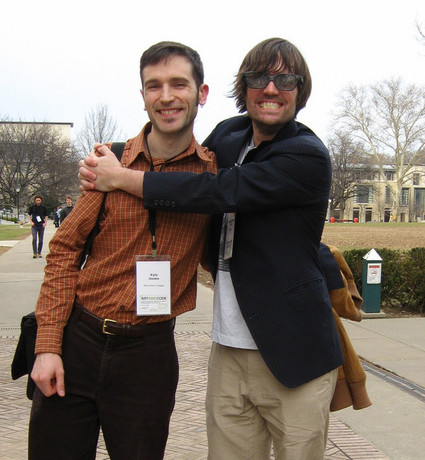
Shoes was originally conceived and coded by _why the lucky stiff, creator of the Poignant Guide to Ruby.
Shoes is now maintained by Team Shoes, a group of friendly Rubyist who can be found on the Shoes librelist or #shoes on freenode.
Baby Steps on Ruby Shoesday
An empty Shoes application:
1 Shoes.app do
2
3 end
This here app contains a button with a click block:
   1  Shoes.app :title => 'Clickity Boom', :width => 300, :height => 300 do
   2    button 'I Dare You' do
   3      alert 'Booyakasha'
   4    end
   5  end
Stacks and Flows
Layout is handled using boxes called stacks and flows:
- Elements within a stack, stack. (Like block level elements in HTML.)
- Elements within a flow, flow. (Like inline elements in HTML.)
Let us silently judge these two apps:
   1  Shoes.app do                     Shoes.app do
   2    flow do                          stack do
   3      button 'One'                     button 'One'
   4      button 'Two'                     button 'Two'
   5      button 'Buckle Shoe'             button 'Buckle Shoe'
   6    end                              end
   7  end                              end
Nested Stacks and Flows
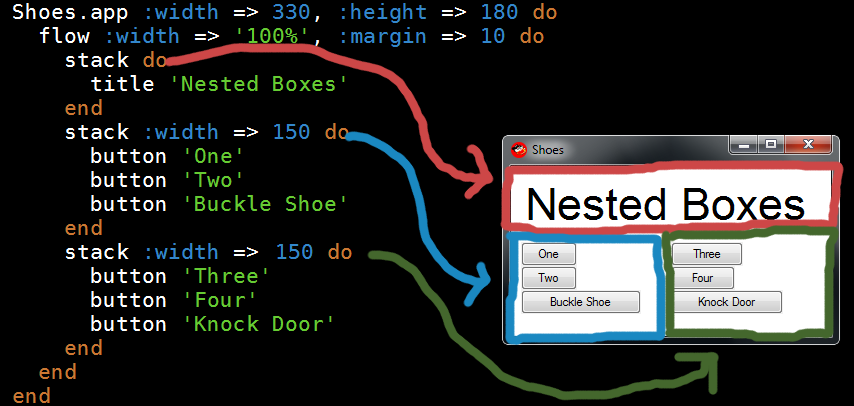
Note: Arrows are not to scale.
Para Stands for Paragraph
Text is output with para:
   1  Shoes.app :title => 'Stacks' do
   2    stack do
   3      para 'We are a way for the cosmos to know itself.'
   4      para 'Mutiple ', 'arguments ', 'are stitched ', 'together.'
   5    end
   6  end
Inline styles can be applied:
   1  Shoes.app :title => 'Q and A' do
   2    stack do
   3      para strong('Q. '), 'Do you believe in free will?'
   4      para em(strong('A. '), 'Nah, dream is destiny.')
   5    end
   6  end
Styling Text
Paragraphs can be styled.
Styles can be set using an options hash:
1 para 'Lorizzle ipsum dolizzle sizzle amizzle.', :stroke => red
They can also be applied on a saved para object:
   1    @text = para 'Learn to Question. Question to Learn.'
   2    @text.stroke = blue
   3    @text.style(:font =>'Times 12px', :underline => 'single')
Your Users Have Fingers
Elements like edit_box and edit_line allow for user input:
1 Shoes.app :height => 250, :width => 200 do
2 stack :margin => 10 do
3 @edit = edit_line :width => '90%' do
4
5 @para.text = @edit.text
6 end
7 @para = para ''
8 button 'what?' do
9 alert 'I SAID: ' + @edit.text
10 end
11 end
12 end
Images and You
Images are displayed using image.
Images can accept an optional click block and their source path can be changed at any time.
   1  Shoes.app :title => 'Soda Pups', :height => 375, :width => 610 do
   2    flow do
   3      image 'pup.png'
   4      @img = image 'pup.png' do
   5        @img.path = 'surprised_dog.jpg'
   6      end
   7    end
   8  end
Shoes.url and link
   1  class ImageViewer < Shoes
   2    url '/', :index
   3    url '/stone', :stone
   4
   5    def index
   6      stack :margin => 20 do
   7        image 'sign.jpg', :click => '/stone'
   8        para link('Nothing is set in stone...', :click => '/stone')
   9      end
  10    end
  11
  12    def stone
  13      stack :margin => 20 do
  14        image 'nothing.jpg', :click => '/'
  15        para link('If you hit this sign...', :click => '/')
  16      end
  17    end
  18  end
  19
  20  Shoes.app :title => 'Navigating a Sea of URL', :height => 425, :width => 550
2D Primitives
Drawing with Shoes is a snap.
   1  Shoes.app do
   2    fill rgb(0, 0.6, 0.9, 0.05)
   3    stroke rgb(0, 0.6, 0.9, 0.5)
   4
   5    30.times do
   6      star(rand(self.width), rand(self.width), (5..7).rand)
   7    end
   8
   9    fill rgb(0.6, 0, 0.8, 0.1)
  10    stroke rgb(0.6, 0, 0.8, 0.9)
  11
  12    35.times do
  13      arrow(rand(self.width), rand(self.width), (20..100).rand)
  14    end
  15  end
Animation
Animation blocks re-draw at a target FPS.
   1  Shoes.app do
   2    trails = [[0,0]] * 60
   3
   4    animate(24) do
   5      clear do
   6        trails.shift
   7        trails << self.mouse[1,2]
   8
   9        trails.each_with_index do |(x, y), i|
  10          oval :left => x, :top => y, :radius => i, :center => true
  11        end
  12      end
  13    end
  14  end
Shoes 4 and the Rainbow of Shoes
The Shoes Team has experimented with different implementations:
- Red Shoes (Original Codebase GTK/Cocoa/C/Objective C/etc.)
- White Shoes (RSpec test Suite)
- Blue Shoes (Shoes on QT)
- Green Shoes (Pure Ruby Shoes using GTK/Cairo)
- Orange Shoes (Apps “Compile” to HTML5 Canvas JS)
Shoes 4.pre has just been released! See: Blog Announcement
Shoes 4 runs on JRuby. It’s a gem and a complete rewrite in 100% Ruby.
Things We Didn't Cover
There are many things we didn’t cover:
- More Controls:
list_box, radio, check, progress, etc.
- Backgrounds, Borders, Colours andGradients
- Cross-platform Packaging: Bundle with Shoes and wrap as a native executable.
- Event Blocks:
keypress { |key| #code }
- Bloopsaphone: Programmatic Chiptunes!
- And there is more…