This module will focus on the use of looping structures to automate the repetitive execution of blocks of code.
Two specific looping structures will be explored:
Upon completion of this module, you should be able to:
Iteration is the act of repeating a process with the aim of approaching a desired goal or result.
In programming, iterative structures are used to compact lengthly repetitive code. Shorter code is easier for humans to understand. Decreasing the length of your source code will also make it easier to debug by eliminating unnecessary complexity.
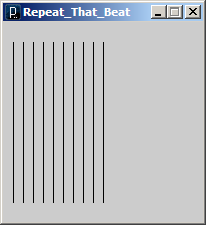
Imagine we wish to draw 10 parallel line with a horizontal spacing of 10 pixels:
size(200,200);
line(10, 20, 10, 180);
line(20, 20, 20, 180);
line(30, 20, 30, 180);
line(40, 20, 40, 180);
line(50, 20, 50, 180);
// ... repeated for x position 60 through 90
line(100, 20, 100, 180);
We can optimize this code somewhat by using a variable for the changing horizontal position of the lines.
int spacing = 10;
size(200,200);
int x = spacing;
line(x, 20, x, 180);
x = x + spacing;
line(x, 20, x, 180);
x = x + spacing;
line(x, 20, x, 180);
x = x + spacing;
line(x, 20, x, 180);
// Repeat 6 more times.
Our code is longer, but more flexible. We can simply change the value of the spacing variable and the horizontal spacing of the drawn lines will change.
We can use a while loop to execute blocks of code repetitively until a specific exit condition is met.
while (test) {
// Code here is executed as long as test evaluates to true.
}
The following loop will repeat forever:
while (true) {
println("Infinity is larger than you can imagine.");
println("Forever is longer than you care to know.");
}
This while loop will be unconditionally ignored:
while (false) {
println("These lonely words will never reach the console.");
println("Theirs is a tale of missed opportunity.");
}
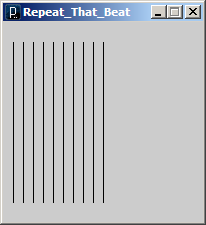
Here’s is our line drawing code re-imagined as a while loop:
int spacing = 10;
int x = spacing; // The initial value of x
size(200,200);
while (x <= 100) { // Define a limit for the value of x
line(x, 20, x, 180);
// Increment x for every pass of the loop.
x = x + spacing;
}
To increase the number of lines drawn to the screen we need only to change the boolean test expression. Try changing the test in the above code to (x <= 180) or (x <= 10) or even (x <= 0). What happens?
Watch out for never ending loops!
To avoid infinite loops we must ensure that the loop test will eventually evaluate as false. Here is some code that suffers from a possible infinite loop:
void setup() {
size(200,200);
}
void draw() {
background(255);
int spacing = mouseX / 2;
int x = spacing;
while(x <= 200) {
line(x, 20, x, 180);
x = x + spacing; // What happens if spacing is 0?
}
}
This is a new version of our line drawing sketch where the spacing between lines is controlled by the built-in mouseX variable. If the spacing is set to 0 using the mouse then the while loop will never terminate.
We can fix the problem in the above code by adding the following directly after the declaration of spacing:
if (spacing <= 0 ) {
spacing = 0; // Binding to a lower bound of zero.
}
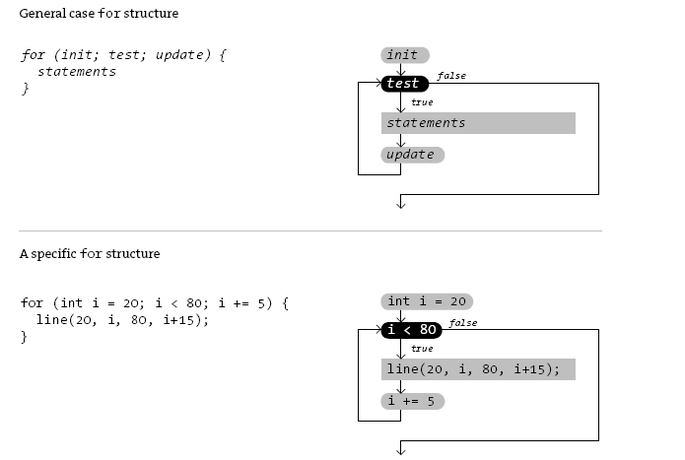
The for loop is another type of repetition structure especially suited to counting.
for (init; test; update) {
// Code block
}
Notice that the parentheses associated with the structure enclose three statements (init, test, and update) with semi-colons between them.
The init statement assigns the initial value of the variable used in the test. The update is used to modify the variable after each iteration through the block.
A for loop runs in the following sequence:
This code will print the numbers 0 through to 10 to the console:
for (int i = 0; i <= 10; i++) {
println(i);
}
This code will count by twos:
for (int i = 0; i <= 10; i = i + 2) {
println(i);
}
We can also count in the reverse direction:
for(int i = 10; i >= 0; i--) {
println(i);
}
In the example where we are counting by twos we can replace the update statement with a shorter equivalent statement:
for (int i = 0; i <= 10; i += 2) {
println(i);
}
Loops can contain loops. A loop within a loop is called a nested loop.
// Displays a vertical column of dots.
for (int y = 10; y < 100; y += 10) {
point(10, y);
}
// Displays a horizontal row of dots.
for (int x = 10; x < 100; x += 10) {
point(x, 10);
}
// What will this nested structure display?
for (int y = 10; y < 100; y += 10) {
for (int x = 10; x < 100; x += 10) {
point(x, y);
}
}
Next we will learn how to further reduce code redundancy using custom functions.